Channel Manager for Vacation Rentals: What It Is, Do You Need One, and How to Choose
A channel manager syncs your listing, rates, and calendar across booking platforms from one place. A booking on Airbnb instantly blocks those dates on
By J. MasseyJune 22, 2026· 13 min read
Share
Disclosure: This post may contain affiliate links. If you purchase through our links, we may earn a commission at no extra cost to you. We only recommend tools and services J. Massey's team actually uses.
Learn more →
TL;DR: A channel manager syncs listings, rates, and calendars across booking platforms in real time. You need one when you list a property on 2+ platforms or run 2+ properties anywhere. The cost is $20–$40 per listing monthly. One double-booking costs $1,100 in penalties plus review damage. Build the sync before the first mistake proves you should have.
Core answer:
I have spent 15+ years operating short-term rentals, trained more than 10,000 operators through CashFlowDiary, and recorded 237+ podcast episodes breaking down the deals that work and the ones that do not. The pattern below shows up in every cycle.
A channel manager blocks dates across all platforms within seconds when a guest books on any one platform
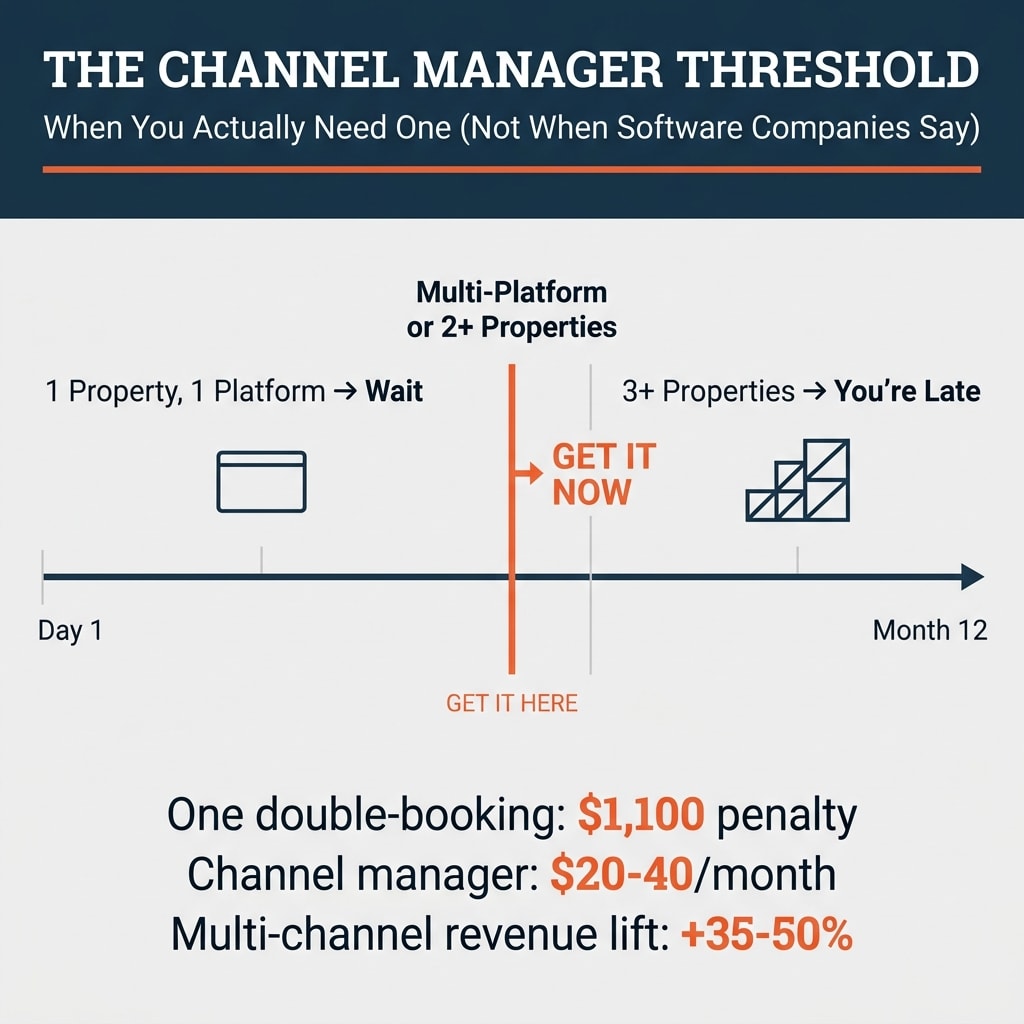
You need one at these thresholds: 1 property on 2+ platforms, or 2+ properties on any platforms
API integration syncs in real time; iCal syncs on 30-minute to 12-hour delays
Pricing runs $20–$40 per listing monthly; percentage models charge 3–5% of revenue
Test before buying: block a date and confirm it closes everywhere within 60 seconds
Most search results on this topic come from companies selling the software. I run STR operations and consult with operators managing real portfolios. This guide includes the threshold where you don't need a channel manager yet. That's the part the sales pages skip.
What a Channel Manager Does
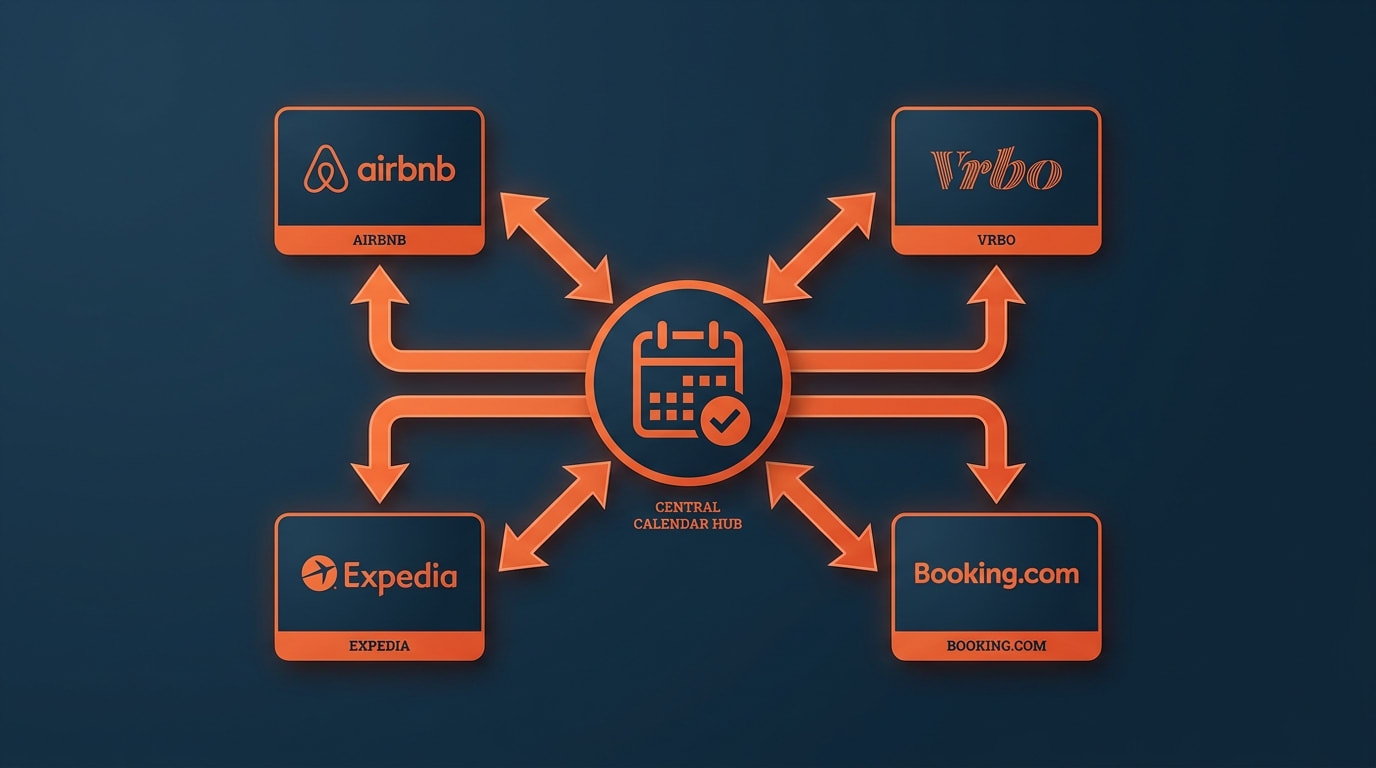
A channel manager connects your listings to multiple booking platforms through one dashboard. A guest books on Airbnb. The channel manager blocks those dates on Vrbo, Expedia, and Booking.com within seconds. You change your nightly rate. The new price pushes to all platforms at once.
The core function is preventing double-bookings when you list the same property on multiple platforms. The secondary function is centralized control of rates, availability, and listing details without logging into each platform separately.
Most channel managers connect to the major booking platforms: Airbnb, Vrbo, Expedia, and Booking.com. Some connect to 20+ platforms including regional or niche sites. The connection runs through API integrations that sync in real time.
Here's what a channel manager doesn't do: guest messaging, cleaning schedules, maintenance requests, owner statements, or team coordination. Those functions belong to a property management system (PMS). The distinction matters when operators buy the wrong tool first.
Key point: A channel manager handles distribution and calendar sync. Full operations require a PMS. Buy the tool that solves the problem you're facing today.
Channel Manager vs. PMS: The Distinction Operators Miss
One calendar syncing across Airbnb, Vrbo, Expedia, and Booking.com via a channel manager
Channel manager = distribution and calendar sync across booking platforms.
PMS (property management system) = full operations including guest messaging, cleaning coordination, maintenance tracking, payment processing, owner reporting, and team management.
Many platforms bundle both and market themselves as "PMS and channel manager." The bundled approach works for operators who need both. The problem shows up when operators buy a full PMS thinking they need a channel manager, then pay for features they won't use for another year.
If you're running one or two properties and your primary pain point is calendar sync across platforms, you need a channel manager. If you're managing guest communication across multiple properties, coordinating cleaning teams, tracking maintenance, and sending owner statements, you need a PMS that includes channel management.
The decision tree: start with the problem you're solving today. Calendar sync and rate management = channel manager. Full operational infrastructure = PMS with channel management included.
Key point: Diagnose the structural problem before buying software. Calendar chaos needs a channel manager. Full operational friction needs a PMS. Buying the wrong one costs you monthly fees on features you're not using.
Do You Need One Yet?
One unit on one platform = you don't need a channel manager.
One unit listed on two or more platforms = the math tips toward a channel manager.
Two or more units on any combination of platforms = get a channel manager before the first double-booking teaches you why.
The threshold: when you list the same property on multiple platforms, or when you run multiple properties across any platforms, the cost of one mistake exceeds the annual cost of the tool that prevents it.
One double-booking costs you $1,100 in penalties plus review damage plus platform trust score hits. Most channel managers run $20–$40 per listing per month. The annual cost for one property across three platforms: $240–$480. One double-booking wipes out two years of channel manager fees and leaves you with operational damage that takes months to repair.
The revenue case: properties listed on 10+ channels earn 35–50% more than single-channel listings. If you're running one property on Airbnb and earning $3,000 monthly, adding Vrbo and Booking.com through a channel manager could add $1,050–$1,500 monthly. The channel manager costs $60–$80 monthly. The ROI clears in the first month.
Build the system before you need it. Not after the first double-booking proves you should have.
Key point: The penalty cost of one double-booking ($1,100 plus review damage) exceeds two years of channel manager fees. The revenue gain from multi-channel distribution (35–50%) pays for the tool in the first month.
How Calendar Sync Works: iCal vs. API
Two methods connect your calendar across platforms: iCal sync and API integration. The difference determines whether you prevent double-bookings or reduce the window.
iCal Sync (Free, Delayed, One-Way)
iCal is a calendar format that platforms export and import. You export your Airbnb calendar as an iCal link, then import it into Vrbo. When a guest books on Airbnb, Vrbo checks the iCal link on its next polling cycle and blocks the dates.
The problem: iCal updates on a delay of 30 minutes to 12 hours depending on the platform's polling schedule. Booking.com won't see your Airbnb calendar block for another 30–90 minutes. The window is long enough for a second guest to book the same dates.
iCal doesn't transmit rate changes, minimum stay requirements, or listing details. Calendar availability only. If you change your nightly rate on Airbnb, Vrbo won't see the update through iCal.
iCal works when booking frequency is low and you're willing to manually manage rates across platforms. It stops working the week you get three bookings in 48 hours.
API Integration (Real-Time, Two-Way, Full Data)
API (Application Programming Interface) connections sync instantly. A booking on Airbnb triggers an immediate block across Vrbo, Expedia, and Booking.com within seconds. Rate changes push to all platforms at once. Minimum stay rules update everywhere simultaneously.
Two-way sync means changes flow in both directions. A booking on any platform blocks the dates everywhere. A rate change in your channel manager updates all connected platforms. A guest cancellation reopens the dates across all channels.
Most channel managers connect to major platforms through direct API integrations. Airbnb, Vrbo, Expedia, and Booking.com all offer API access to channel management tools. Regional or niche platforms sometimes require iCal fallback, but your primary distribution channels should run on API.
The verification test: block a date in your channel manager and confirm it closes on every connected platform within 60 seconds. If the sync takes longer, you're on iCal or the API connection isn't configured correctly.
Key point: API integration syncs in seconds. iCal syncs on 30-minute to 12-hour delays. The delay window on iCal is long enough for double-bookings. Verify API sync before committing to any channel manager.
A double-booking: two reservations colliding on one calendar date
Five evaluation criteria determine whether a channel manager fits your operation.
1. Channel Coverage and Connection Type
Confirm two-way API sync for your primary platforms. If you're running Airbnb, Vrbo, and Booking.com, those three must connect via API, not iCal. Check the channel manager's integration page and verify connection type before signing up.
More channels isn't always better. If you're not listing on Expedia or regional platforms, you don't need a channel manager that connects to 40+ sites. Match the tool to the channels you're using or plan to add within six months.
2. Portfolio Fit
Operators running 1–3 properties don't need enterprise pricing tiers built for property managers running 50+ doors. Look for channel managers that price per listing or offer small-portfolio plans.
Pricing models: most channel managers charge $20–$40 per listing monthly. Some charge a percentage of revenue (3–5%). Normalize both to 12-month total cost including setup fees. A $25 monthly per-listing fee costs $300 yearly. A 3% revenue fee on $36,000 annual revenue costs $1,080 yearly. Run your numbers.
For 10 properties, expect to pay $300–$600 monthly depending on the platform and feature set.
3. PMS Bundling Decision
Decide whether you want distribution-only or full operations in one tool. If you're using a PMS for guest messaging and operations, you need a standalone channel manager that integrates with your existing system. If you're building operational infrastructure from scratch, a bundled PMS with channel management included might be the cleaner path.
The bundled approach costs more upfront but eliminates integration friction. The standalone approach gives you flexibility to swap tools later without rebuilding your entire operation.
4. Lock-In and Exit Strategy
How hard is it to migrate your listings and booking history if you switch channel managers in 18 months? Some platforms export your data cleanly. Some lock your historical data inside their system. Ask before signing up: "If I cancel, what data do I get to export and in what format?"
Contract terms matter. Month-to-month gives you flexibility. Annual contracts with early termination fees lock you in. If you're testing a channel manager for the first time, start with month-to-month even if the annual plan offers a discount.
5. Live Demo Before Committing
Run a real test before paying. Most channel managers offer free trials or demo accounts. Connect one property. Block a date in the channel manager. Confirm it closes on Airbnb, Vrbo, and Booking.com within 60 seconds. Change your nightly rate and verify the update pushes to all platforms.
If the sync doesn't work in the demo, it won't work in production. The demo is the verification test. Don't skip it.
Key point: Test API sync speed in the demo before buying. Block a date and confirm it closes everywhere within 60 seconds. Verify data export options and contract flexibility before signing.
The Multi-Channel Revenue Case
Single-platform operators leave revenue on the table. The majority of active vacation rental properties list on more than one platform. The operators still running Airbnb-only are competing against properties that show up on Vrbo, Booking.com, and Expedia simultaneously.
The data: properties on 10+ channels earn 35–50% more than single-channel listings. The math on a property earning $3,000 monthly on Airbnb alone: adding Vrbo and Booking.com through a channel manager could add $1,050–$1,500 monthly. The channel manager costs $60–$80 monthly. The net gain is $970–$1,420 monthly.
Multi-channel distribution reduces platform risk. Airbnb suspends accounts. Vrbo changes policies. Booking.com adjusts commission structures. Operators running single-platform operations absorb 100% of the risk. Operators running multi-channel distribution spread it across three or four platforms.
The threshold for adding a second platform: when your occupancy on your primary platform hits 70%+ consistently and you're turning away booking requests. That's the signal you have demand overflow that a second platform could capture.
Key point: Multi-channel distribution adds 35–50% more revenue and spreads platform risk. Add a second channel when occupancy hits 70%+ consistently on your primary platform.
When to Add a Channel Manager: The Operator Timeline
A single dashboard cleanly syncing all booking platforms
Month 1–3: One property on Airbnb. No channel manager needed. Focus on getting the operations running and the first reviews posted.
Month 4–6: Occupancy stabilizes above 60%. Add Vrbo as a second platform. Set up a channel manager before listing on Vrbo to prevent double-bookings from day one.
Month 7–12: Add Booking.com or Expedia if demand supports it. Your channel manager handles the sync. Adding a third platform takes 30 minutes instead of rebuilding your entire calendar system.
Property 2: Add the second property to your existing channel manager. The marginal cost is one additional listing fee ($20–$40 monthly). The operational benefit is managing both properties from one dashboard instead of juggling four platform logins per property.
The pattern: build the infrastructure before you need it. Operators who add the channel manager after the first double-booking are fixing a problem that cost them $1,100 and damaged their platform standing. Operators who add it before listing on a second platform prevent the problem entirely.
Key point: Set up the channel manager before listing on a second platform, not after the first double-booking. The infrastructure prevents the mistake instead of cleaning up after it.
Frequently Asked Questions
What is a channel manager for vacation rentals?
A channel manager syncs your property listing, rates, and calendar across multiple booking platforms from one dashboard. When a guest books on Airbnb, the channel manager blocks those dates on Vrbo, Expedia, and Booking.com within seconds to prevent double-bookings.
What's the difference between a PMS and a channel manager?
A channel manager handles distribution and calendar sync across booking platforms. A PMS (property management system) runs full operations including guest messaging, cleaning coordination, payments, and reporting. Many platforms bundle both functions.
Do I need a channel manager for one Airbnb?
No. One property on one platform doesn't require a channel manager. You need one when you list the same property on two or more platforms, or when you run multiple properties across any platforms.
Does a channel manager sync with Expedia and Booking.com?
Yes. Most channel managers connect to Expedia and Booking.com through direct API integrations that sync in real time. Verify the connection type before signing up to confirm it's API-based, not iCal.
What is two-way calendar sync?
Two-way sync means changes flow in both directions between your channel manager and booking platforms. A booking on any platform blocks the dates everywhere. A rate change in your channel manager updates all connected platforms simultaneously.
How much does a channel manager cost?
Most channel managers charge $20–$40 per listing monthly. For 10 properties, expect to pay $300–$600 monthly. Some platforms charge a percentage of revenue (3–5%) instead of a flat fee.
When should I add a channel manager?
Add a channel manager when you list one property on 2+ platforms or run 2+ properties on any platforms. Set it up before the first double-booking costs you $1,100 in penalties plus review damage.
What's the difference between iCal and API sync?
API sync updates in seconds across all platforms. iCal sync updates on a 30-minute to 12-hour delay depending on platform polling schedules. The delay window on iCal creates double-booking risk. API is the standard for channel managers.
Key Takeaways
A channel manager prevents double-bookings by syncing calendars, rates, and availability across booking platforms in real time
You need one at these thresholds: 1 property on 2+ platforms, or 2+ properties on any platforms
API integration syncs instantly; iCal syncs on 30-minute to 12-hour delays that create double-booking windows
One double-booking costs $1,100 in penalties plus review damage; channel managers cost $20–$40 per listing monthly
Multi-channel distribution adds 35–50% more revenue and spreads platform risk across multiple booking sites
Test before buying: block a date and confirm it closes on all platforms within 60 seconds
Build the system before listing on a second platform, not after the first double-booking proves you needed it
Next Steps
If you're running one property on one platform, keep running it until occupancy hits 70%+ consistently. That's the signal to add a second platform and set up a channel manager.
If you're on two platforms and managing calendars manually, add a channel manager this week. The cost of the first double-booking exceeds two years of channel manager fees.
If you're evaluating channel managers, run the live demo test: block a date and confirm it syncs to all platforms within 60 seconds. That's the verification the tool works in production.
For operators building STR operations from scratch, grab the free STR Software Stack Checklist at newsletter.cashflowdiary.com/welcome. It maps the tools you need at each stage from first listing to 10+ properties.
For operators who want a diagnostic on whether your current setup is leaving revenue on the table, book a free call at cashflowdiary.com/diagnostic. We'll walk through your operation and show you what's broken and how to fix it.
Build the system before you need it. The calendar sync you set up today prevents the double-booking that would cost you $1,100 next month.